iOS静态代码分析

参考文章:

背景

随着代码量的日益增加,以及团队的扩大,代码的质量需要有一定的保证,再加上目前有些功能需要oem给客户使用,一些KA用户会要求提供一些代码分析报告,所以本文将总结一下如何搭建iOS静态代码分析系统


本文涉及的工具及平台:

大部分iOS平台静态分析基本是基于开源的oclint进行的,本文虽然使用sonarqube,但免费的分析方案核心仍然是oclint

sonarqube是一个开源的静态代码分析平台,提供免费的社区版,免费的社区版不支持oc,但github有提供开源的插件,可以支持OC代码分析,付费的社区版plus有支持oc的分析插件SonarCFamily for C

无论免费方案还是付费方案,首先都是基于xcodebuid过程中的日志来进行的,下面总结下两种方案配置流程:

xcodebuild

iOS核心工具,安装好Xcode就会自带此工具,因为oclint分析的核心是xcodebuild在编译app过程中的log,所以需要xcodebuild(build失败也会对已经build的日志进行分析,但尽量保证可以build成功)

如果项目是在workspace中需要指定-workspace和对应的scheme,可以通过xcodebuild -list查看

1
2
3
4
5
6
7
8
9
10
11
12
13
14
15
16
17
18
19
$ xcodebuild -list
Information about project "HHTestOClint":
Targets:
HHTestOClint_Example
HHTestOClint_Tests
Build Configurations:
Debug
Release
If no build configuration is specified and -scheme is not passed then "Release" is used.
Schemes:
HHTestOClint-Example
//执行
$ xcodebuild -workspace HHTestOClint.xcworkspace -scheme HHTestOClint-Example
error: Signing for "HHTestOClint_Example" requires a development team. Select a development team in the Signing & Capabilities editor. (in target 'HHTestOClint_Example' from project 'HHTestOClint')

我们并不需要打出的包可以安装到手机上,只是需要build过程中的日志而已,所以我们只需要打出模拟器包Debug便可

1
2
3
4
5
6
7
$ xcodebuild -showsdks
iOS SDKs:
iOS 13.2 -sdk iphoneos13.2
iOS Simulator SDKs:
Simulator - iOS 13.2 -sdk iphonesimulator13.2

因为xcodebuild会有缓存,所以我们每次执行前需要clean

1
xcodebuild -workspace HHTestOClint.xcworkspace -scheme -configuration Debug HHTestOClint-Example -sdk iphonesimulator13.2 clean build

能编译成功的话就可以进入下一步了

sonarqube

sonarqube是一个提供代码静态分析的平台,提供了一套完整的静态分析方案,包括后端及前端页面,可以结合jenkins、gitlab等平台来进行代码分析。
因为其底层源码为java开发的,所以对java代码支持比较完善,但是免费的社区版并不支持OC,所以我们如果要借助此平台的话,有以下两种方式:

  1. 开源插件sonar-object-c
    • github上开源的插件,目前作者已经停止迭代,上面是找了好久找到的能兼容sonarqube7.9的版本 ,核心是使用oclint检查,目前只有70+规则,但是可以自定义规则
  2. 付费使用社区版plus,提供了SonarCFamily for C插件
    • 有官方提供技术支持,250+的rules可供选择,不可自定义规则

安装sonar-services

无论使用上面哪种方案,首先要将服务搭建好服务,搭建服务有两种方式

  1. docker安装

  2. 下载安装包

下面主要总结使用安装包的配置流程:

安装包下载完成后,执行sonarqube-7.9.1/bin/macosx-universal-64/sonar.sh start,此时http://localhost:9000/应该已经可以访问了,默认账号为admin密码为admin,如果启动失败可以去sonarqube-7.9.1/logs下查看日志

启动成功后我们在最下面会看到warning

建议我们自己配置数据库,下面我们就来配置数据库(mysql后续将不再支持):这里我们使用的是PostgreSQL配置参考

1
2
3
4
$ brew install postgresql //安装
$ pg_ctl -D /usr/local/var/postgres start //启动
$ createdb //创建数据库
$ psql //登录控制台

数据库安装好后,我们需要提供一个数据库和账号供sonarqube使用

1
2
CREATE USER sonarqube WITH PASSWORD 'sonarqube';//创建用户
CREATE DATABASE sonar OWNER sonarqube;//创建属于该用户的数据库

然后我们去sonarqube-7.9.1/conf目录下编辑sonar.properties,将数据库相应配置配置完成

1
2
3
sonar.jdbc.username=sonarqube
sonar.jdbc.password=sonarqube
sonar.jdbc.url=jdbc:postgresql://localhost/sonar

编辑完成后执行sonarqube-7.9.1/bin/macosx-universal-64/sonar.sh restart,此时警告已经消除了
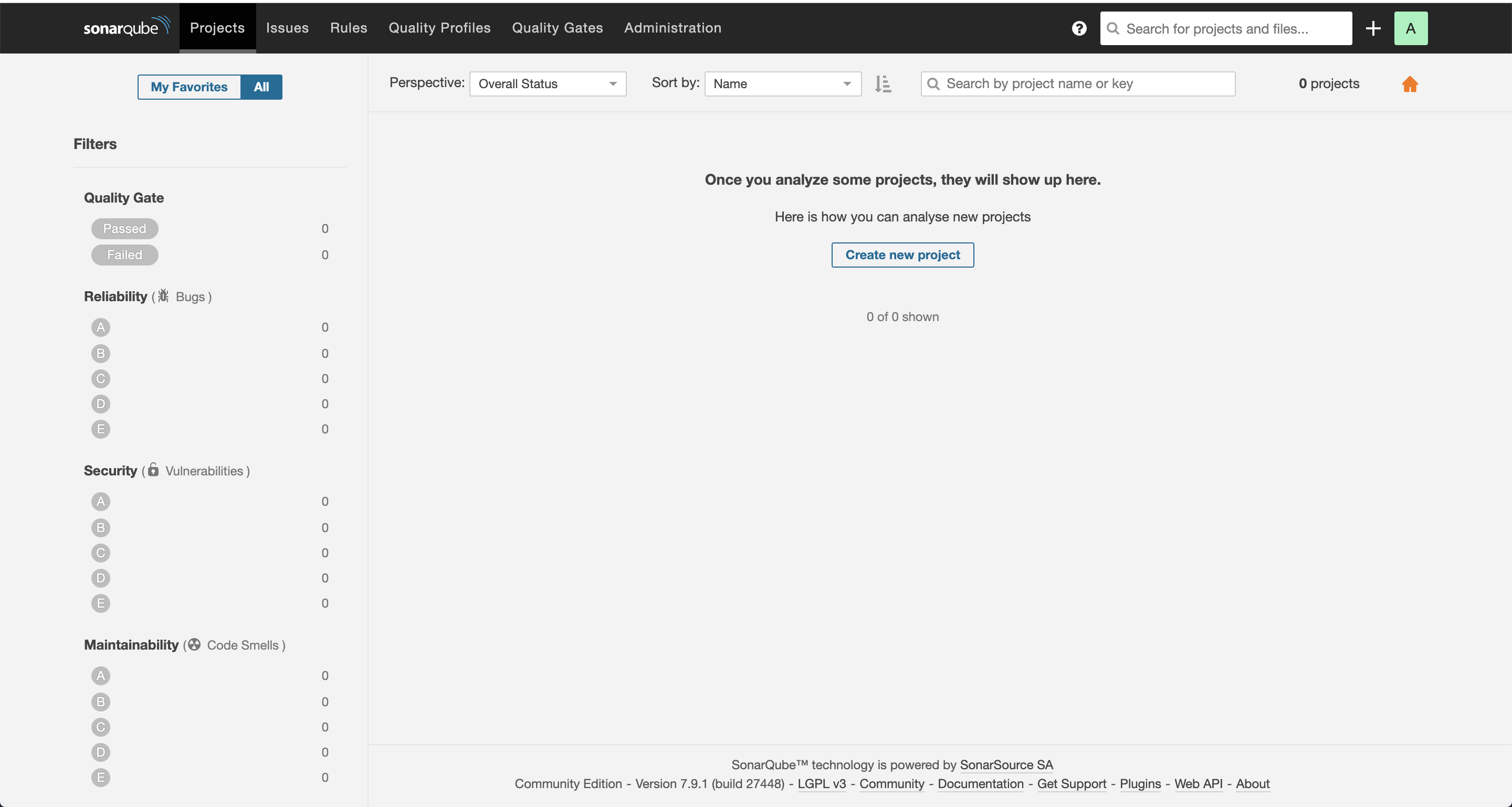
至此我们的sonarqube的前端服务已经配置完成了

以下是配置过程中可能遇到的问题:

  • java.security.AccessControlException: access denied

  • Sonarqube will not start due to elasticsearch being unable to write yml settings file

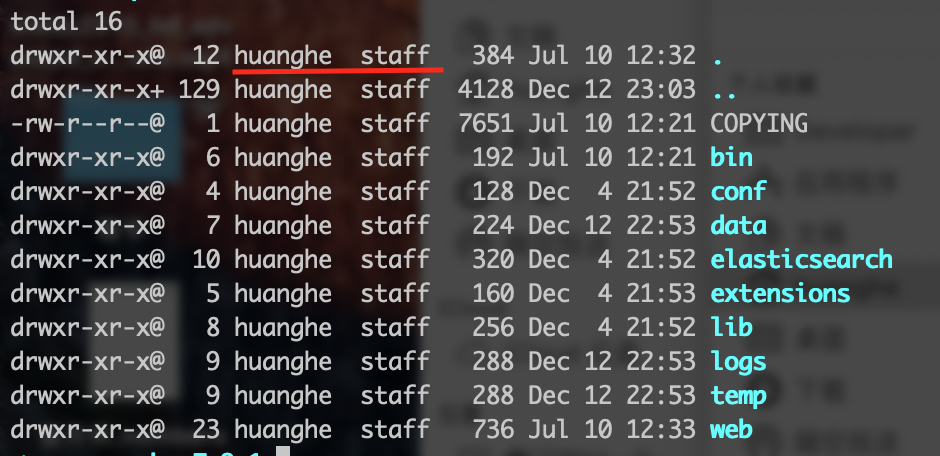
    • elasticsearch不支持root用户启动,ls -la检查报错文件夹是否归属为root,如果为root就使用修改所属用户
  • mysql连接失败(换个数据库吧)

下载sonar-scanner

  1. 下载sonar-scanner for cli
  2. sonascanner添加至环境变量export PATH=$PATH:/path/to/scanner/(建议将此命令放到配置环境里,保证每个终端都包含此环境变量)

开源方案

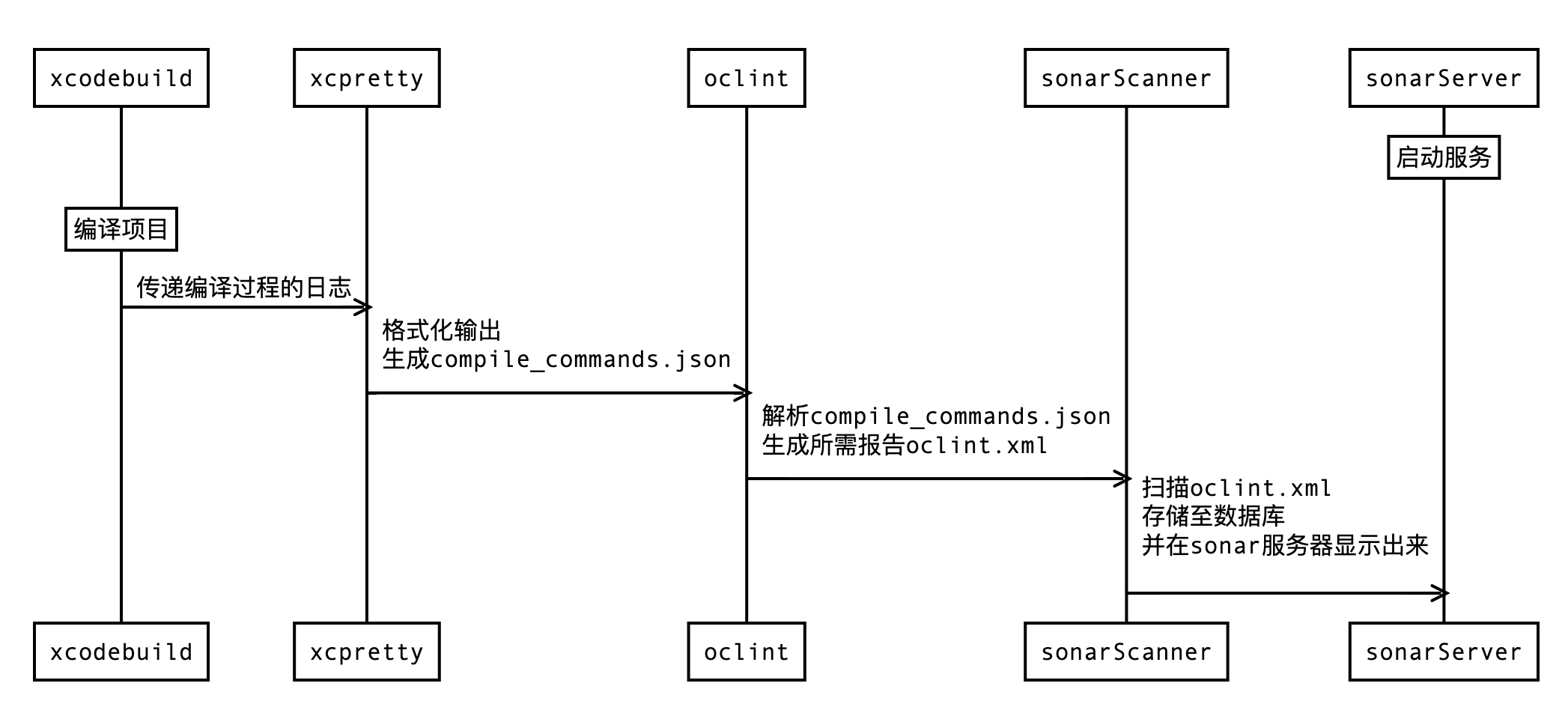
对于使用开源方案来说,本质流程如下
xcpretty

xcpretty is a fast and flexible formatter for xcodebuild. It does one thing, and it should do it well.

xcpretty是一个格式化xcodebuild输出的工具,安装

1
2
3
4
5
6
7
8
9
10
11
12
13
14
15
16
$ gem install xcpretty
[!] Usage: xcodebuild [options] | xcpretty
-t, --test Use RSpec style output
-s, --simple Use simple output (default)
-k, --knock Use knock output
--tap Use TAP output
-f, --formatter PATH Use formatter returned from evaluating the specified Ruby file
-c, --[no-]color Use colorized output. Default is auto
--[no-]utf Use unicode characters in output. Default is auto.
-r, --report FORMAT or PATH Run FORMAT or PATH reporter
Choices: junit, html, json-compilation-database
-o, --output PATH Write report output to PATH
--screenshots Collect screenshots in the HTML report
-h, --help Show this message
-v, --version Show version

-r, --report 指定生成的报告格式可选为junit, html, json-compilation-database

-o, --output指定生成的文件名称
这里我们使用json-compilation-database格式,输出文件名为compile_commands.json
(注意输出名称不能更改,否则后面oclint会报错,因为oclint源码中内置了校验名称,此处便是写死的解析文件名称的代码

1
$ xcodebuild -workspace HHTestOClint.xcworkspace -scheme HHTestOClint-Example -sdk iphonesimulator13.2 clean build | xcpretty -r json-compilation-database -o compile_commands.json

OClint

OCLint is a static code analysis tool for improving quality and reducing defects by inspecting C, C++ and Objective-C code

OClint是进行OC代码分析的核心工具,主要对上一步生成的compile_commands.json进行分析,生成报告

1
2
3
4
5
6
7
8
9
10
11
12
13
14
15
16
17
18
19
20
$ oclint --help
Generic Options:
-help - Display available options (-help-hidden for more)
-help-list - Display list of available options (-help-list-hidden for more)
-version - Display the version of this program
OCLint options:
-disable-rule=<rule name> - Disable rules
-list-enabled-rules - List enabled rules
-max-priority-1=<threshold> - The max allowed number of priority 1 violations
-max-priority-2=<threshold> - The max allowed number of priority 2 violations
-max-priority-3=<threshold> - The max allowed number of priority 3 violations
-o=<path> 输出文件路径
-p=<string> 解析路径
-rc=<parameter>=<value> 指定校验规则取值
-report-type=<name> 生成报告类型
For more information, please visit http://oclint.org

其中我们主要使用oclint-json-compilation-databaseGithub源码

oclint-json-compilation-database支持指定校验文件夹和过滤指定文件夹,本质上最终执行oclint -p命令,可以通过附加-v查看,同时还支持使用--后面跟上oclint执行参数

1
2
// 此处--符号后的参数是传递给oclint的
oclint-json-compilation-database -v -e Pods -e xxxx -- -report-type html -o report.html

oclint-rc选项可以自定义校验的参数值,如

1
oclint-json-compilation-database -v -e Pods -e xxxx -- -rc LONG_METHOD=60 -rc LONG_LINE=100

当我们需要自定义多个oclint参数时,我们可以将配置写在.oclint文件

1
2
3
4
5
6
7
8
9
10
11
12
13
14
15
disable-rules: // 不使用的规则
- LongLine
rulePaths: // oclint校验规则所在的路径,Mac端默认在/usr/local/lib/oclint/rules,如果不需要自定义规则的话可以不配置此项
- /etc/rules
rule-configurations: // 自定义配置参数
- key: CYCLOMATIC_COMPLEXITY
value: 15
- key: NPATH_COMPLEXITY
value: 300
output: oclint.xml // 生成的报告
report-type: xml // 生成的报告格式支持html、xml、json等
max-priority-1: 20 // 级别1的问题最大个数,如果检测出的问题超过这个个数就会自动终止
max-priority-2: 40 // 级别2的问题最大个数
max-priority-3: 60 // 级别3的问题最大个数
enable-clang-static-analyzer: false //

以下是所有支持的Rule,可以通过 -list-enabled-rules x查看

1
2
3
4
5
6
7
8
9
10
11
12
13
14
15
16
17
18
19
20
21
22
23
24
25
26
27
28
29
30
31
32
33
34
35
36
37
38
39
40
41
42
43
44
45
46
47
48
49
50
51
52
53
54
55
56
57
58
59
60
61
62
63
64
65
66
67
68
69
70
71
72
Enabled rules:
- TooManyMethods
- DestructorOfVirtualClass
- DeadCode
- EmptyForStatement
- AvoidDefaultArgumentsOnVirtualMethods
- ProblematicBaseClassDestructor
- MisplacedDefaultLabel
- EmptyFinallyStatement
- CallingProhibitedMethod
- RedundantIfStatement
- CollapsibleIfStatements
- UnnecessaryElseStatement
- ConstantConditionalOperator
- DeepNestedBlock
- AssignIvarOutsideAccessors
- UnnecessaryNullCheckForDealloc
- RedundantNilCheck
- RedundantLocalVariable
- EmptyDoWhileStatement
- UnusedMethodParameter
- BitwiseOperatorInConditional
- ReturnFromFinallyBlock
- MultipleUnaryOperator
- DoubleNegative
- MissingCallToBaseMethod
- EmptyWhileStatement
- ShortVariableName
- ParameterReassignment
- UselessParentheses
- ThrowExceptionFromFinallyBlock
- UnnecessaryDefaultStatement
- HighNcssMethod
- PreferEarlyExit
- MissingBreakInSwitchStatement
- TooManyParameters
- CallingProtectedMethod
- AvoidBranchingStatementAsLastInLoop
- MissingAbstractMethodImplementation
- MissingHashMethod
- MisplacedNullCheck
- MisplacedNilCheck
- UseContainerLiteral
- LongLine
- ForLoopShouldBeWhileLoop
- HighNPathComplexity
- LongMethod
- EmptySwitchStatement
- RedundantConditionalOperator
- EmptyTryStatement
- EmptyCatchStatement
- UseObjectSubscripting
- AvoidPrivateStaticMembers
- EmptyElseBlock
- InvertedLogic
- LongClass
- LongVariableName
- GotoStatement
- BrokenOddnessCheck
- UseNumberLiteral
- TooFewBranchesInSwitchStatement
- UseBoxedExpression
- JumbledIncrementer
- EmptyIfStatement
- MissingDefaultStatement
- HighCyclomaticComplexity
- NonCaseLabelInSwitchStatement
- ConstantIfExpression
- BrokenNullCheck
- BrokenNilCheck
- TooManyFields
- UnusedLocalVariable

最终我们将.oclint放在与compile_commands.json相同的路径下,并在该路径下执行

1
oclint-json-compilation-database -v -e Pods -e Example

最终会生成oclint.xml(可以自己生成html格式,查看效果)

开源插件sonar-object-c

  1. 下载jar包到sonarqube-7.9.1/extensions/plugins,然后重启服务器
  2. 下载sonar-scanner for cli
  3. sonascanner添加至环境变量export PATH=$PATH:/path/to/scanner/(建议将此命令放到配置环境里,保证每个终端都包含此环境变量)

上述配置安装完成后,我们在需要检测的项目跟路径下创建sonar-project.properties文件,下面是简单的内容

1
2
3
4
5
6
7
8
9
# Required metadata
sonar.projectKey=xxxx // 项目key 随便定义
sonar.projectName=xxxx // 项目名称一般与检测项目一致,显示在sonar的web页面上
sonar.projectVersion=xx // 项目版本
# Comma-separated paths to directories with sources
sonar.sources=xxxxx // 项目需要检测的源码路径
sonar.objc.file.suffixes=.h,.m // oc 文件前缀
sonar.sourceEncoding=UTF-8 // 编码
sonar.objectivec.oclint.report=oclint.xml

这里的核心便是在上面步骤中由OCLint生成的xml文件,另外注意这里有一个坑,oclint.xml必须放至sonar-reports文件下,无论sonar.objectivec.oclint.report配置是什么,貌似都不生效
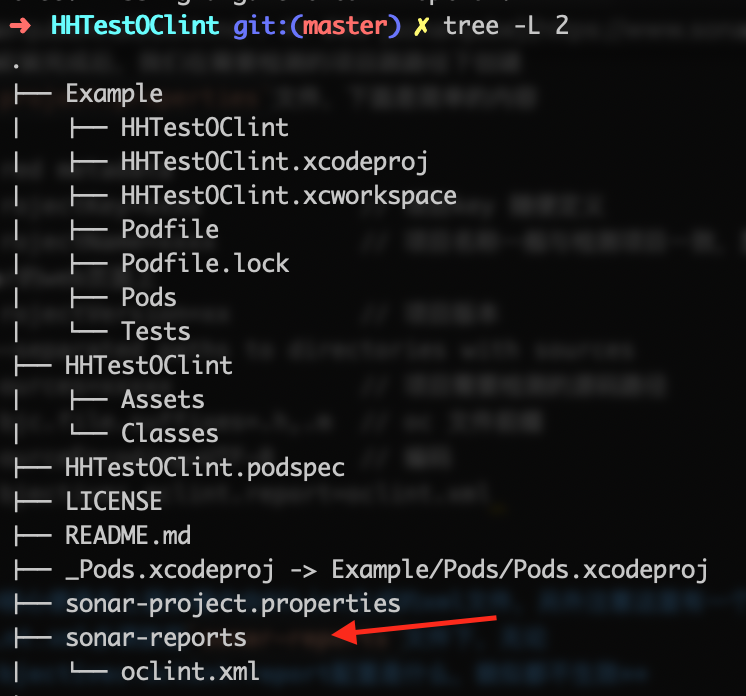
创建完成后,在sonar-project.properties路径下执行sonar-scanner,执行成功后,便可在sonar的前端页面看到对应的检测效果了
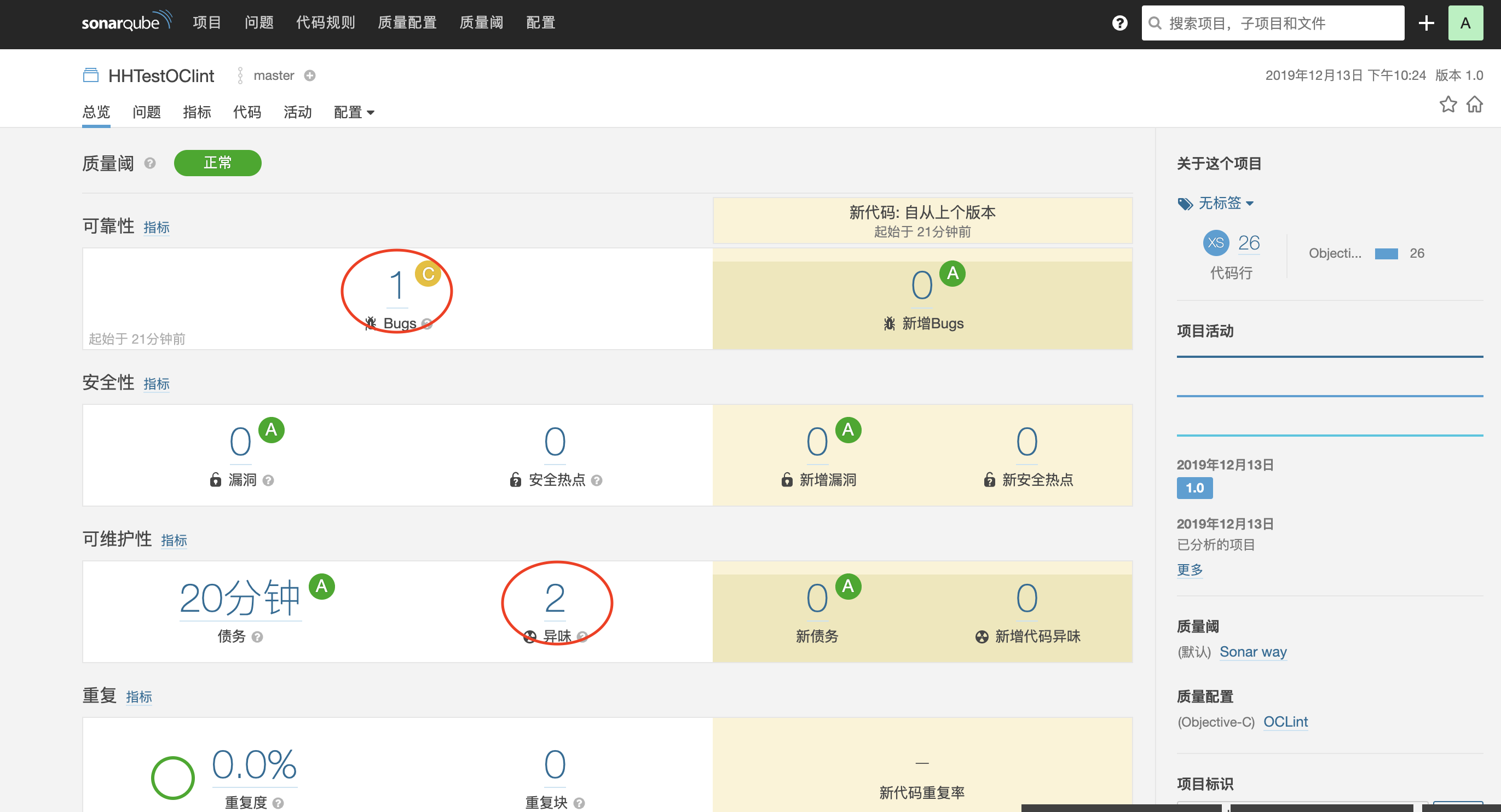
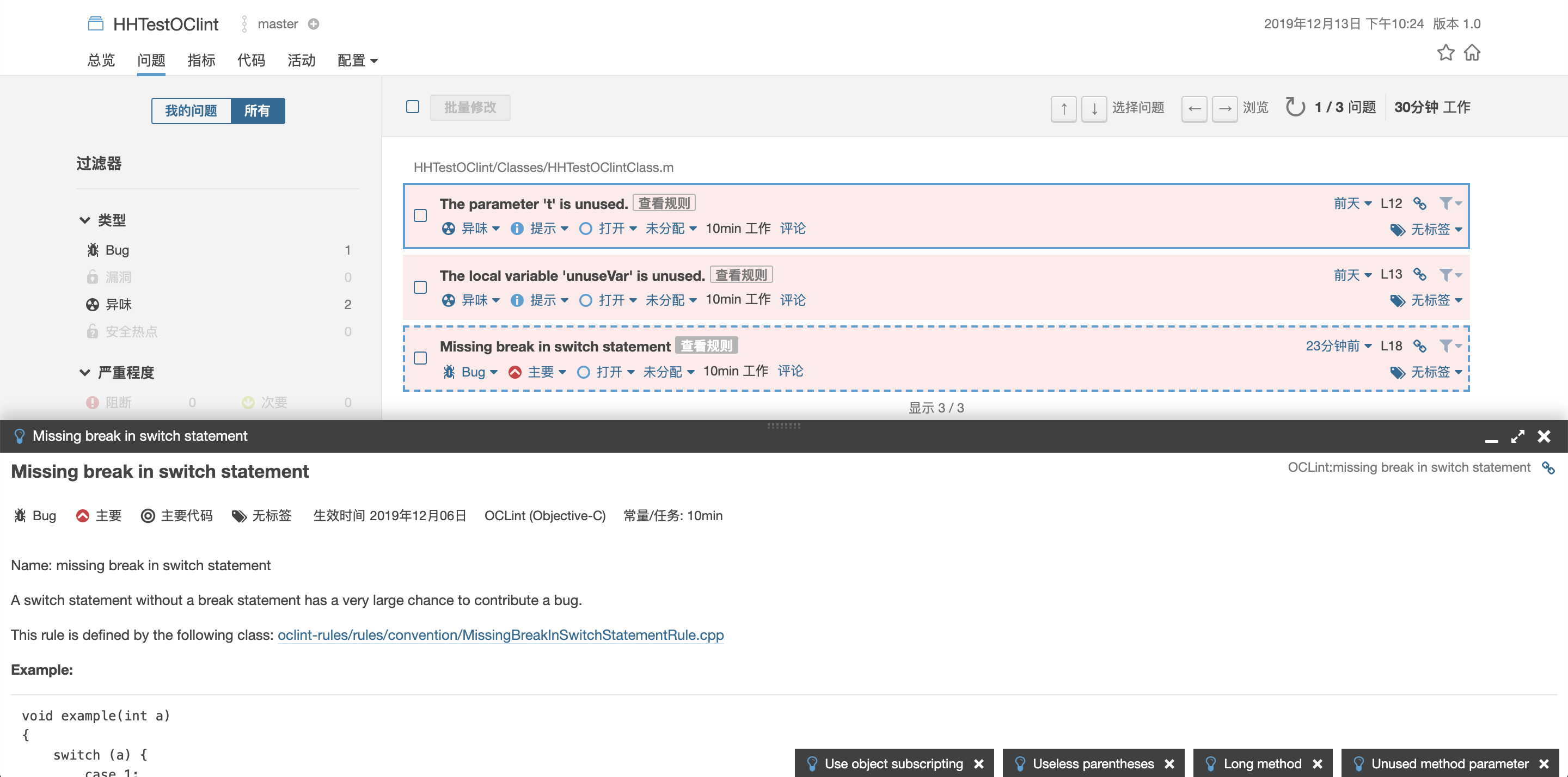
点击对应结果,可以查看详细信息,如果我们想过滤某些规则,或者自定义一些规则的取值,可以使用上面介绍的.oclint文件进行自定义配置
付费方案

build-wrapper

build-wrapper是sonarqube开发的一个日志分析工具,只有部署了付费版的服务才可以下载,下载路径为{SonarQube URL}/static/cpp/build-wrapper-macosx-x86.zip

付费插件SonarCFamily for C

  1. 申请试用社区版plus,获取试用序列号
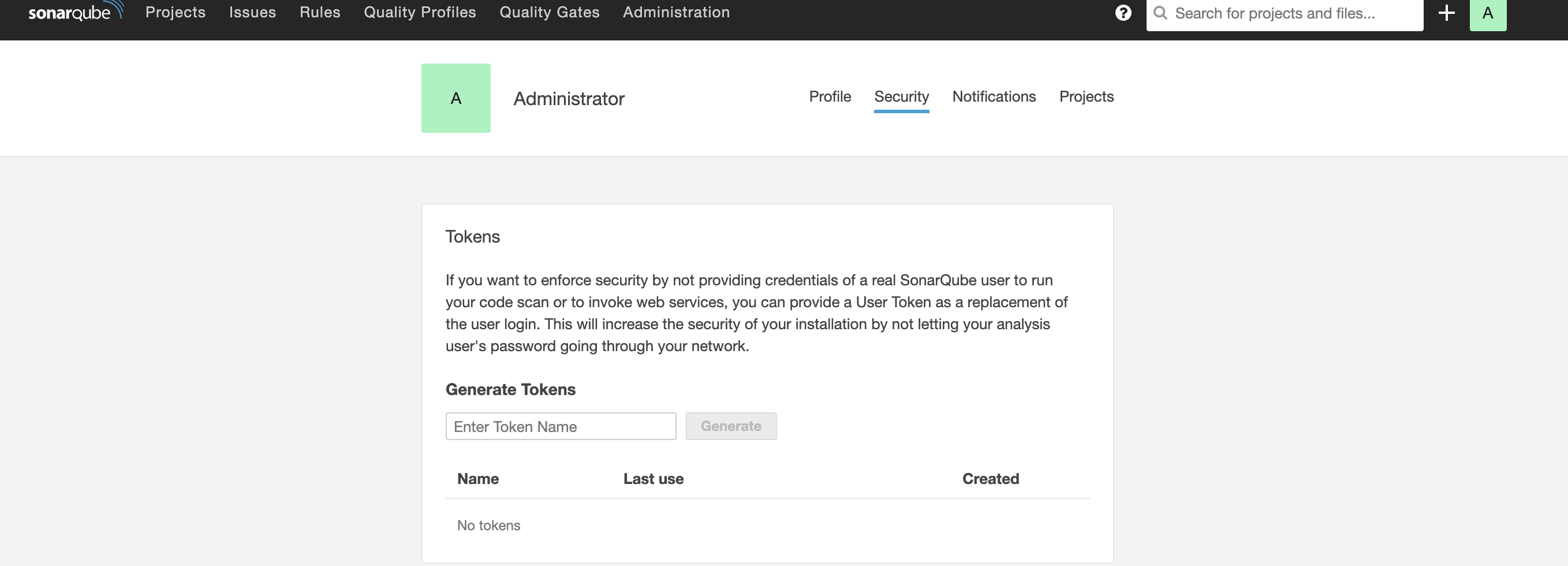
  2. 登录admin,点击Administrator-> My Account -> Security,生成Tokens
上述配置安装完成后,我们在需要检测的项目跟路径下创建sonar-project.properties文件,下面是简单的内容

1
2
3
4
5
6
7
8
9
10
11
12
13
14
15
16
17
18
# Required metadata
sonar.projectKey=xxx
sonar.projectName=xxx
sonar.projectVersion=1.0
sonar.language=objc
# Comma-separated paths to directories with sources
sonar.sources=xxx
sonar.login=xxxxx //此处为生成的密钥,为安全起见可不在此处配置,在启动命令中添加
sonar.c.file.suffixes=
sonar.objc.file.suffixes=.h,.m
# Encoding of the source files
sonar.sourceEncoding=UTF-8
# The build-wrapper output dir
sonar.cfamily.build-wrapper-output=DerivedData/compilation-database

详细参考开源项目objc-llvm

创建完成后,在根目录下执行

1
2
3
4
5
mkdir DerivedData
~/build-wrapper-macosx-x86/build-wrapper-macosx-x86 --out-dir DerivedData/compilation-database xcodebuild -workspace xxxxx.xcworkspace -scheme xxxx-Example -configuration Debug COMPILER_INDEX_STORE_ENABLE=NO -destination 'platform=iOS Simulator,name=iPhone 8,OS=13.2' clean build
最后执行`sonar-scanner`,将结果解析并上传

我们可以看到,付费版仍然需要xcodebuild,至于build-wrapper应该是sonarqube官方开发的类似于oclint的分析工具。

区别

下面我们对比下开源版本和付费版本的区别:

  • 规则
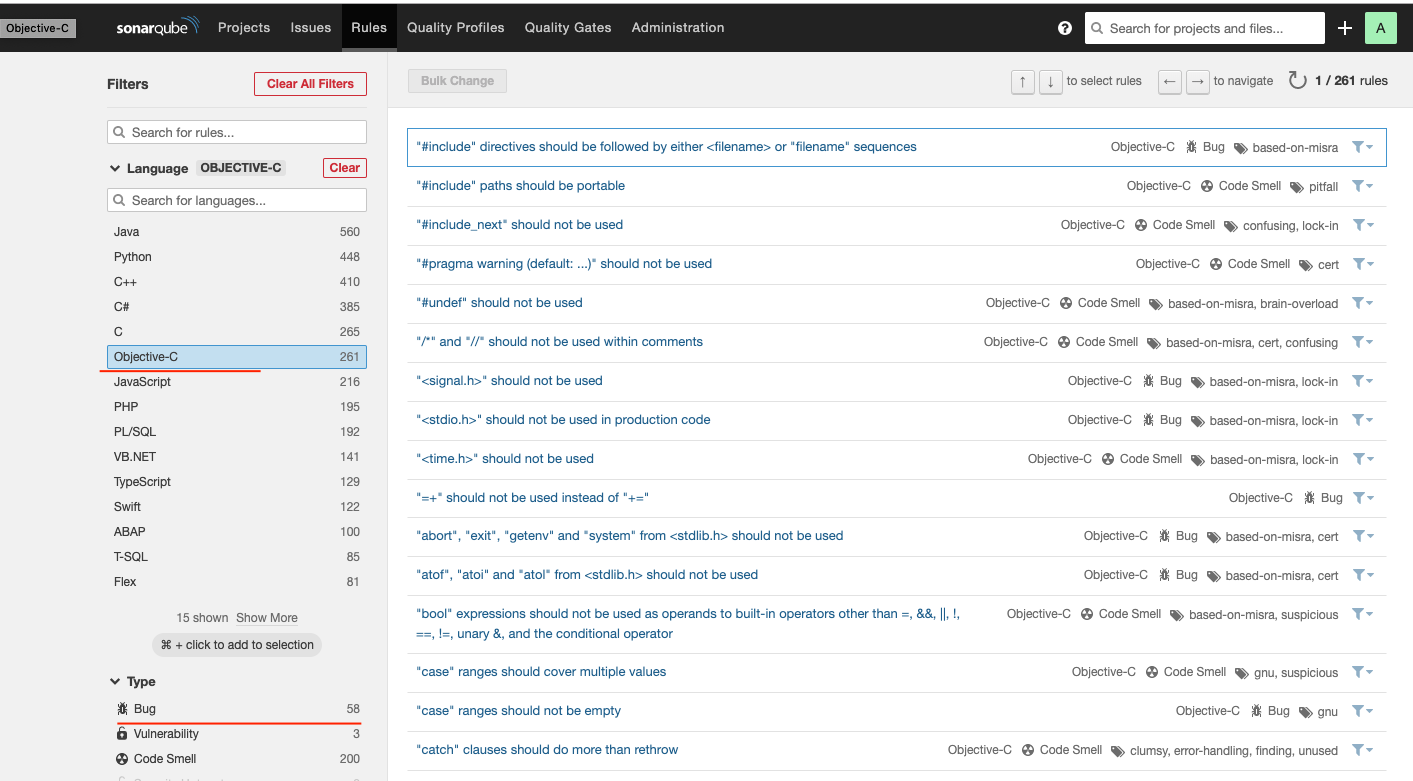
    • 付费版有261个规则,其中bug类58个
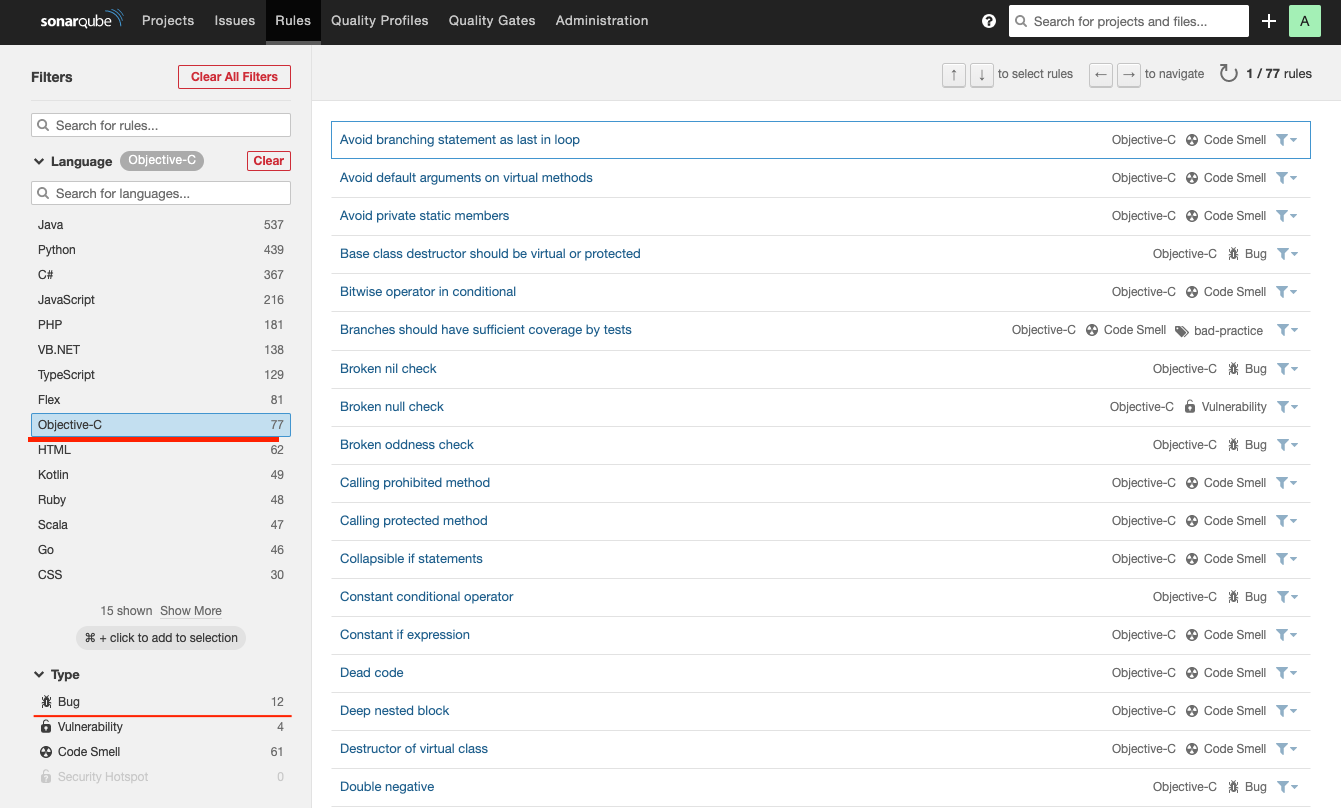
    • 开源版有77个规则,其中bug类12个

付费方案
开源方案

  • 相同代码不同处理规则

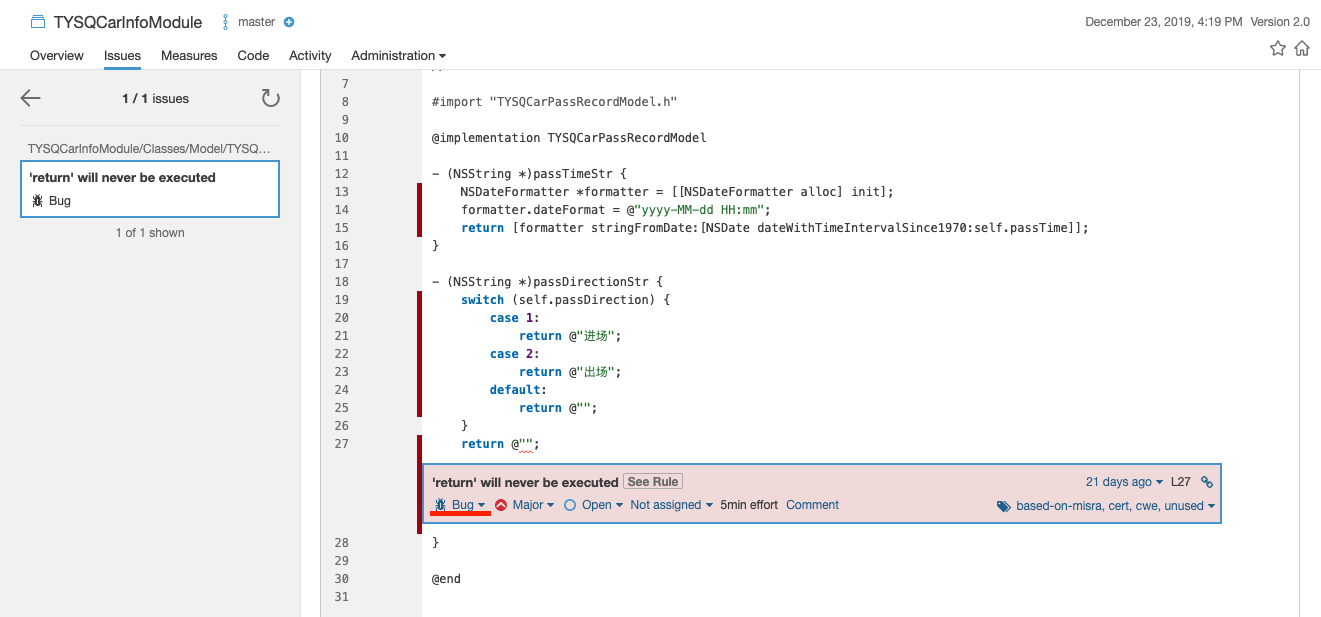
    • 同样的代码付费版本认为是bug
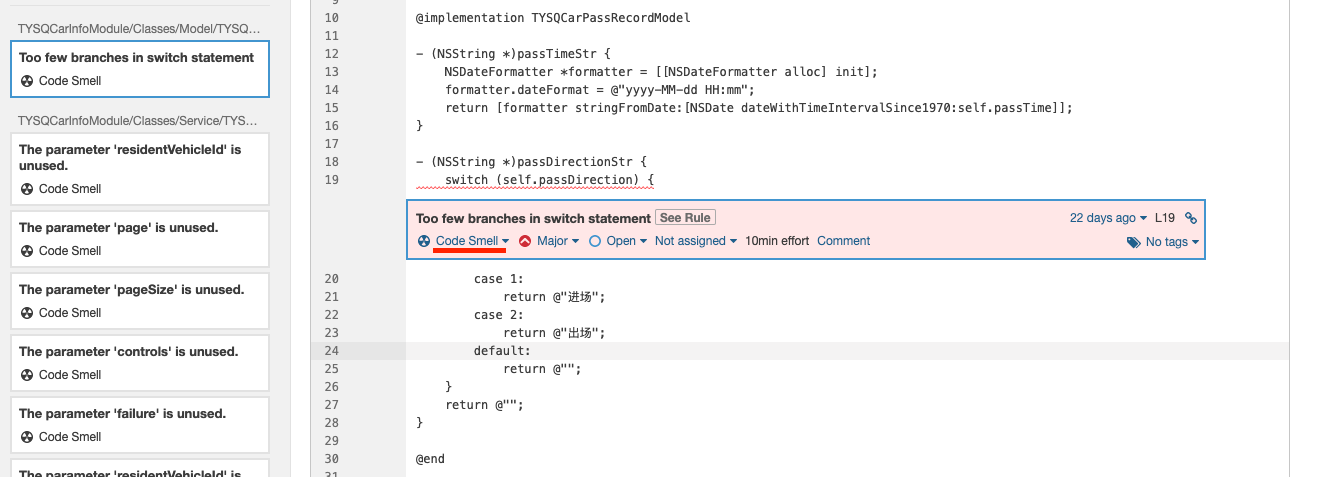
    • 开源版本判定为Code Smell
      付费方案
      开源方案
  • 成本

    • 开源方案免费,但规则需自己使用c++开发
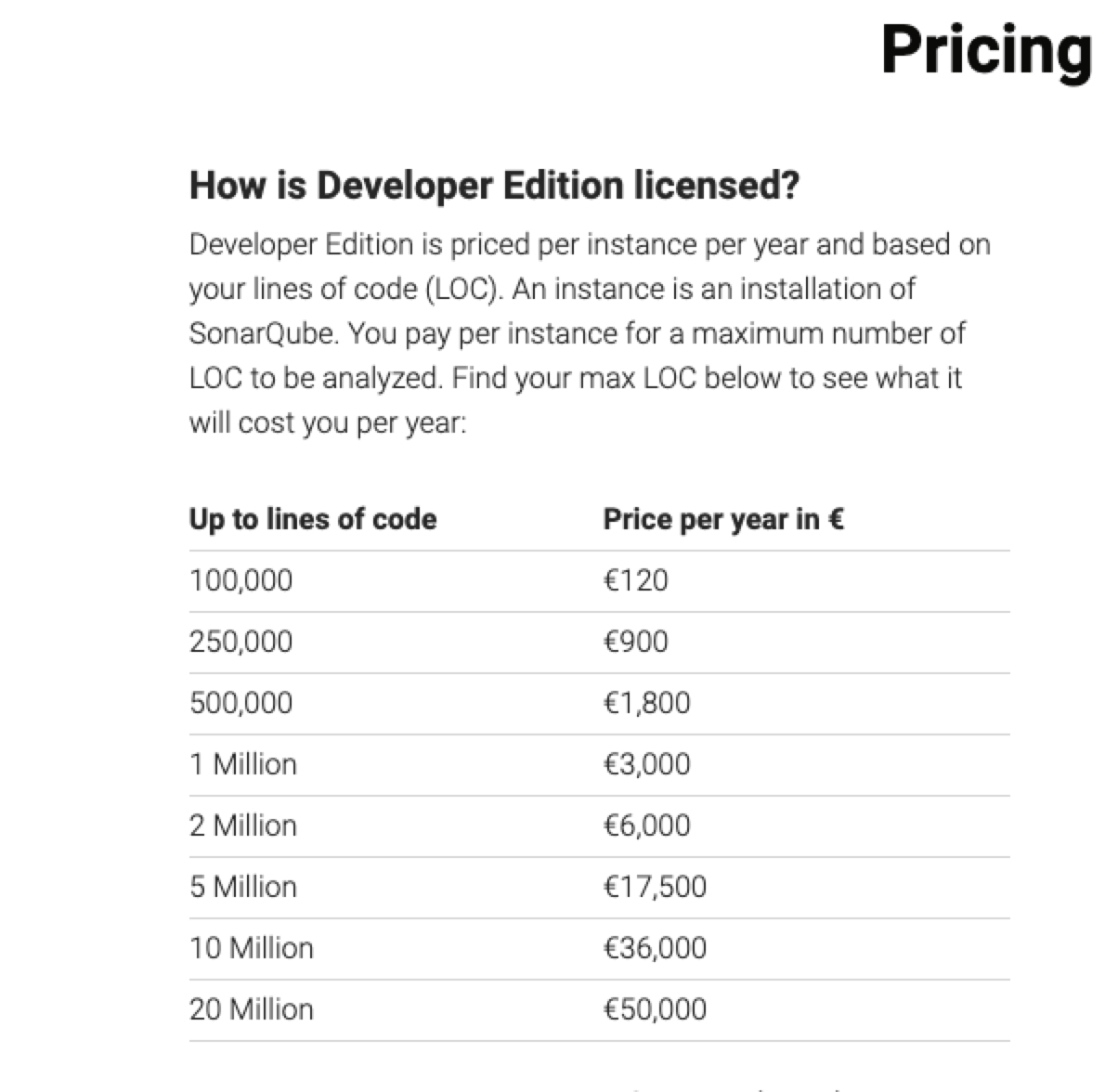
    • 付费方案按不同代码规模有不同计价方式
      付费方案

总结

从上面可以看出,开源方案其实核心就是oclint,只是借助了sonarqube提供的前端服务而已,所以如果有自定义需求,可以考虑自己搭建服务。而付费方案则是sonarqube官方提供了一系列判定规则,可能更契合代码规范,但是不能支持自定义

虽然oclint提供的rule只有70+,还有一些是不适用oc的,但可以支持自定义规则,可定制性很高,所以如果不打算使用付费版的话,可以考虑自行定制规则。